- Get link
- X
- Other Apps
What is SQL Injection (SQLi) and How to Prevent It
SQL Injection (SQLi) is a type of an injection attack that makes it possible to execute malicious SQL statements. These statements control a database server behind a web application. Attackers can use SQL Injection vulnerabilities to bypass application security measures. They can go around authentication and authorization of a web page or web application and retrieve the content of the entire SQL database. They can also use SQL Injection to add, modify, and delete records in the database.
An SQL Injection vulnerability may affect any website or web application that uses an SQL database such as MySQL, Oracle, SQL Server, or others. Criminals may use it to gain unauthorized access to your sensitive data: customer information, personal data, trade secrets, intellectual property, and more. SQL Injection attacks are one of the oldest, most prevalent, and most dangerous web application vulnerabilities. The OWASP organization (Open Web Application Security Project) lists injections in their OWASP Top 10 2017 document as the number one threat to web application security.
How and Why Is an SQL Injection Attack Performed
To make an SQL Injection attack, an attacker must first find vulnerable user inputs within the web page or web application. A web page or web application that has an SQL Injection vulnerability uses such user input directly in an SQL query. The attacker can create input content. Such content is often called a malicious payload and is the key part of the attack. After the attacker sends this content, malicious SQL commands are executed in the database.
SQL is a query language that was designed to manage data stored in relational databases. You can use it to access, modify, and delete data. Many web applications and websites store all the data in SQL databases. In some cases, you can also use SQL commands to run operating system commands. Therefore, a successful SQL Injection attack can have very serious consequences.
- Attackers can use SQL Injections to find the credentials of other users in the database. They can then impersonate these users. The impersonated user may be a database administrator with all database privileges.
- SQL lets you select and output data from the database. An SQL Injection vulnerability could allow the attacker to gain complete access to all data in a database server.
- SQL also lets you alter data in a database and add new data. For example, in a financial application, an attacker could use SQL Injection to alter balances, void transactions, or transfer money to their account.
- You can use SQL to delete records from a database, even drop tables. Even if the administrator makes database backups, deletion of data could affect application availability until the database is restored. Also, backups may not cover the most recent data.
- In some database servers, you can access the operating system using the database server. This may be intentional or accidental. In such case, an attacker could use an SQL Injection as the initial vector and then attack the internal network behind a firewall.
There are several types of SQL Injection attacks: in-band SQLi (using database errors or UNION commands), blind SQLi, and out-of-band SQLi. You can read more about them in the following articles: Types of SQL Injection (SQLi), Blind SQL Injection: What is it.
To follow step-by-step how an SQL Injection attack is performed and what serious consequences it may have, see: Exploiting SQL Injection: a Hands-on Example.
Simple SQL Injection Example
The first example is very simple. It shows, how an attacker can use an SQL Injection vulnerability to go around application security and authenticate as the administrator.
The following script is pseudocode executed on a web server. It is a simple example of authenticating with a username and a password. The example database has a table named
users with the following columns: username and password.# Define POST variables
uname = request.POST['username']
passwd = request.POST['password']
# SQL query vulnerable to SQLi
sql = “SELECT id FROM users WHERE username=’” + uname + “’ AND password=’” + passwd + “’”
# Execute the SQL statement
database.execute(sql)
These input fields are vulnerable to SQL Injection. An attacker could use SQL commands in the input in a way that would alter the SQL statement executed by the database server. For example, they could use a trick involving a single quote and set the
passwd field to:password' OR 1=1
As a result, the database server runs the following SQL query:
SELECT id FROM users WHERE username='username' AND password='password' OR 1=1'
Because of the
OR 1=1 statement, the WHERE clause returns the first id from the users table no matter what the username and password are. The first user id in a database is very often the administrator. In this way, the attacker not only bypasses authentication but also gains administrator privileges. They can also comment out the rest of the SQL statement to control the execution of the SQL query further:-- MySQL, MSSQL, Oracle, PostgreSQL, SQLite
' OR '1'='1' --
' OR '1'='1' /*
-- MySQL
' OR '1'='1' #
-- Access (using null characters)
' OR '1'='1'
' OR '1'='1' %16Example of a Union-Based SQL Injection
One of the most common types of SQL Injection uses the UNION operator. It allows the attacker to combine the results of two or more SELECT statements into a single result. The technique is called union-based SQL Injection.
The following is an example of this technique. It uses the web page testphp.vulnweb.com, an intentionally vulnerable website hosted by Acunetix.
The following HTTP request is a normal request that a legitimate user would send:
GET http://testphp.vulnweb.com/artists.php?artist=1 HTTP/1.1
Host: testphp.vulnweb.com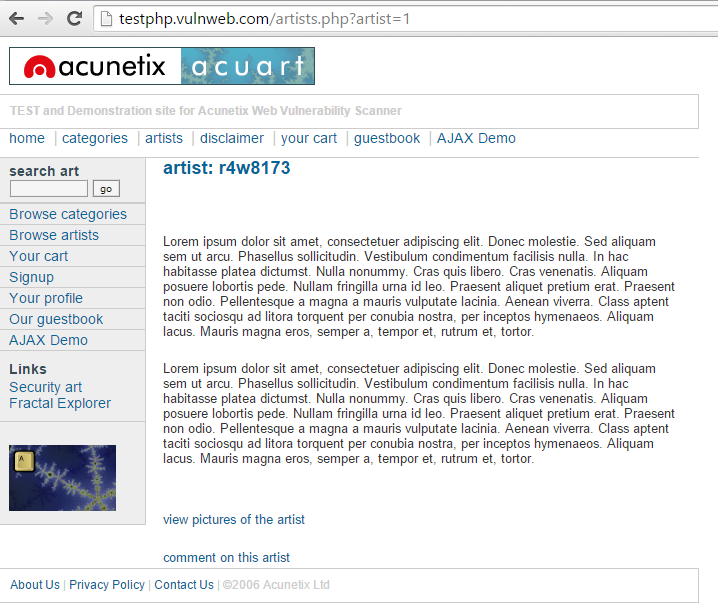
The
artist parameter is vulnerable to SQL Injection. The following payload modifies the query to look for an inexistent record. It sets the value in the URL query string to -1. Of course, it could be any other value that does not exist in the database. However, a negative value is a good guess because an identifier in a database is rarely a negative number.
In SQL Injection, the
UNION operator is commonly used to attach a malicious SQL query to the original query intended to be run by the web application. The result of the injected query will be joined with the result of the original query. This allows the attacker to obtain column values from other tables.GET http://testphp.vulnweb.com/artists.php?artist=-1 UNION SELECT 1, 2, 3 HTTP/1.1
Host: testphp.vulnweb.com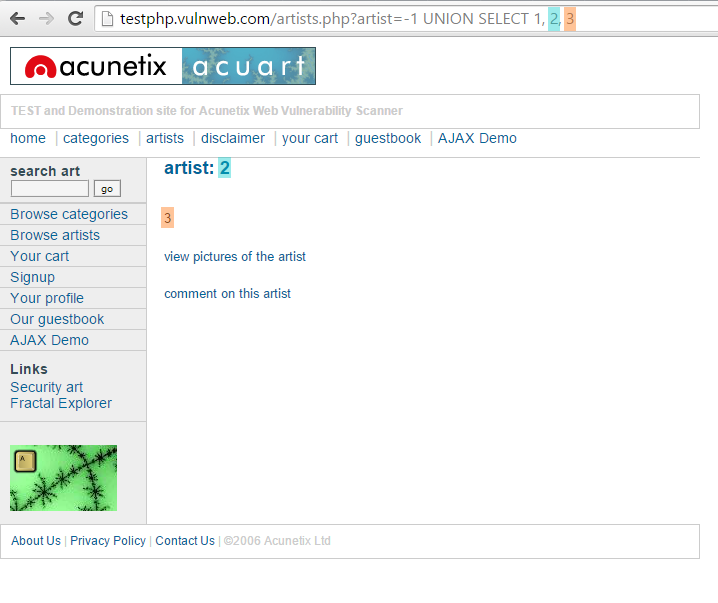
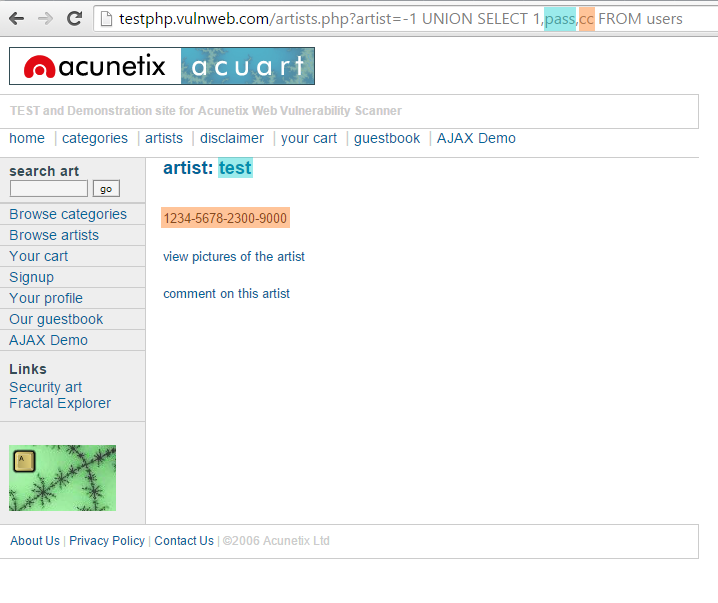
The following example shows how an SQL Injection payload could be used to obtain more meaningful data from this intentionally vulnerable site:
GET http://testphp.vulnweb.com/artists.php?artist=-1 UNION SELECT 1,pass,cc FROM users WHERE uname='test' HTTP/1.1
Host: testphp.vulnweb.com
How to Prevent an SQL Injection
The only sure way to prevent SQL Injection attacks is input validation and parametrized queries including prepared statements. The application code should never use the input directly. The developer must sanitize all input, not only web form inputs such as login forms. They must remove potential malicious code elements such as single quotes. It is also a good idea to turn off the visibility of database errors on your production sites. Database errors can be used with SQL Injection to gain information about your database.
If you discover an SQL Injection vulnerability, for example using an Acunetix scan, you may be unable to fix it immediately. For example, the vulnerability may be in open source code. In such cases, you can use a web application firewall to sanitize your input temporarily.
To learn how to prevent SQL Injection attacks in the PHP language, see: Preventing SQL Injection Vulnerabilities in PHP Applications and Fixing Them. To find out how to do it in many other different programming languages, refer to the Bobby Tables guide to preventing SQL Injection.
What is SQL Injection (SQLi) and How to Prevent It
SQL Injection (SQLi) is a type of an injection attack that makes it possible to execute malicious SQL statements. These statements control a database server behind a web application. Attackers can use SQL Injection vulnerabilities to bypass application security measures. They can go around authentication and authorization of a web page or web application and retrieve the content of the entire SQL database. They can also use SQL Injection to add, modify, and delete records in the database.
An SQL Injection vulnerability may affect any website or web application that uses an SQL database such as MySQL, Oracle, SQL Server, or others. Criminals may use it to gain unauthorized access to your sensitive data: customer information, personal data, trade secrets, intellectual property, and more. SQL Injection attacks are one of the oldest, most prevalent, and most dangerous web application vulnerabilities. The OWASP organization (Open Web Application Security Project) lists injections in their OWASP Top 10 2017 document as the number one threat to web application security.
SQL Injection
How and Why Is an SQL Injection Attack Performed
To make an SQL Injection attack, an attacker must first find vulnerable user inputs within the web page or web application. A web page or web application that has an SQL Injection vulnerability uses such user input directly in an SQL query. The attacker can create input content. Such content is often called a malicious payload and is the key part of the attack. After the attacker sends this content, malicious SQL commands are executed in the database.
SQL is a query language that was designed to manage data stored in relational databases. You can use it to access, modify, and delete data. Many web applications and websites store all the data in SQL databases. In some cases, you can also use SQL commands to run operating system commands. Therefore, a successful SQL Injection attack can have very serious consequences.
Attackers can use SQL Injections to find the credentials of other users in the database. They can then impersonate these users. The impersonated user may be a database administrator with all database privileges.
SQL lets you select and output data from the database. An SQL Injection vulnerability could allow the attacker to gain complete access to all data in a database server.
SQL also lets you alter data in a database and add new data. For example, in a financial application, an attacker could use SQL Injection to alter balances, void transactions, or transfer money to their account.
You can use SQL to delete records from a database, even drop tables. Even if the administrator makes database backups, deletion of data could affect application availability until the database is restored. Also, backups may not cover the most recent data.
In some database servers, you can access the operating system using the database server. This may be intentional or accidental. In such case, an attacker could use an SQL Injection as the initial vector and then attack the internal network behind a firewall.
There are several types of SQL Injection attacks: in-band SQLi (using database errors or UNION commands), blind SQLi, and out-of-band SQLi. You can read more about them in the following articles: Types of SQL Injection (SQLi), Blind SQL Injection: What is it.
To follow step-by-step how an SQL Injection attack is performed and what serious consequences it may have, see: Exploiting SQL Injection: a Hands-on Example.
Simple SQL Injection Example
The first example is very simple. It shows, how an attacker can use an SQL Injection vulnerability to go around application security and authenticate as the administrator.
The following script is pseudocode executed on a web server. It is a simple example of authenticating with a username and a password. The example database has a table named users with the following columns: username and password.
# Define POST variables
uname = request.POST['username']
passwd = request.POST['password']

# SQL query vulnerable to SQLi
sql = “SELECT id FROM users WHERE username=’” + uname + “’ AND password=’” + passwd + “’”

# Execute the SQL statement
database.execute(sql)
These input fields are vulnerable to SQL Injection. An attacker could use SQL commands in the input in a way that would alter the SQL statement executed by the database server. For example, they could use a trick involving a single quote and set the passwd field to:
password' OR 1=1
As a result, the database server runs the following SQL query:
SELECT id FROM users WHERE username='username' AND password='password' OR 1=1'
Because of the OR 1=1 statement, the WHERE clause returns the first id from the users table no matter what the username and password are. The first user id in a database is very often the administrator. In this way, the attacker not only bypasses authentication but also gains administrator privileges. They can also comment out the rest of the SQL statement to control the execution of the SQL query further:
-- MySQL, MSSQL, Oracle, PostgreSQL, SQLite
' OR '1'='1' --
' OR '1'='1' /*
-- MySQL
' OR '1'='1' #
-- Access (using null characters)
' OR '1'='1'
' OR '1'='1' %16
Example of a Union-Based SQL Injection
One of the most common types of SQL Injection uses the UNION operator. It allows the attacker to combine the results of two or more SELECT statements into a single result. The technique is called union-based SQL Injection.
The following is an example of this technique. It uses the web page testphp.vulnweb.com, an intentionally vulnerable website hosted by Acunetix.
The following HTTP request is a normal request that a legitimate user would send:
GET http://testphp.vulnweb.com/artists.php?artist=1 HTTP/1.1
Host: testphp.vulnweb.com
HTTP request a legitimate user would send
The artist parameter is vulnerable to SQL Injection. The following payload modifies the query to look for an inexistent record. It sets the value in the URL query string to -1. Of course, it could be any other value that does not exist in the database. However, a negative value is a good guess because an identifier in a database is rarely a negative number.
In SQL Injection, the UNION operator is commonly used to attach a malicious SQL query to the original query intended to be run by the web application. The result of the injected query will be joined with the result of the original query. This allows the attacker to obtain column values from other tables.
GET http://testphp.vulnweb.com/artists.php?artist=-1 UNION SELECT 1, 2, 3 HTTP/1.1
Host: testphp.vulnweb.com
SQL injection using the UNION operator
The following example shows how an SQL Injection payload could be used to obtain more meaningful data from this intentionally vulnerable site:
GET http://testphp.vulnweb.com/artists.php?artist=-1 UNION SELECT 1,pass,cc FROM users WHERE uname='test' HTTP/1.1
Host: testphp.vulnweb.com
SQL injection using the UNION operator with a FROM clause
How to Prevent an SQL Injection
The only sure way to prevent SQL Injection attacks is input validation and parametrized queries including prepared statements. The application code should never use the input directly. The developer must sanitize all input, not only web form inputs such as login forms. They must remove potential malicious code elements such as single quotes. It is also a good idea to turn off the visibility of database errors on your production sites. Database errors can be used with SQL Injection to gain information about your database.
If you discover an SQL Injection vulnerability, for example using an Acunetix scan, you may be unable to fix it immediately. For example, the vulnerability may be in open source code. In such cases, you can use a web application firewall to sanitize your input temporarily.
To learn how to prevent SQL Injection attacks in the PHP language, see: Preventing SQL Injection Vulnerabilities in PHP Applications and Fixing Them. To find out how to do it in many other different programming languages, refer to the Bobby Tables guide to preventing SQL Injection.
Related course: Photography for Beginners Cameras are complicated. I was frustrated with my first DSLR. I just couldn’t capture what I saw through my viewfinder. It took a ton of trial and error. When I managed to work it all out, I started taking some pretty spectacular images. In this post, I will share with you everything that I’ve learned from my mistakes. A black and white photo of four beginners photographers holding DSLR cameras Infographic As beginner photographers, we tend to be visual learners. And it’s my job to make beginning photography as easy as possible for you. So I thought to myself, “What better way to help beginner photographers learn how to use their cameras, than by creating an infographic?” And that’s exactly what I did. I collaborated with an illustrator friend of mine, and together we made these images. The following are something that will make understanding exposure, and how cameras work, a whole lot easier! Check out what we came up with below: An infographic showing the basic functions of a camera - beginners guide to photography Let’s dive into more depth… Exposure For those beginning photography, exposure is key to capturing a great image. Learning how exposure works will help you to take control of your camera and take better photos. Aperture, shutter speed, ISO are the elements that combine to create an exposure. As you’ll soon learn, these elements have an effect on more than just the exposure. They also cause alterations in depth of field, motion blur, and digital noise. Once you understand how each one works, you can start diving into manual mode. This is where you take control back from your camera. The exposure triangle is a great way to remember the three settings. When combined, they control the amount of light captured from any given scene. This will help you to understand that changing one setting will necessitate a change in the others. That is if you are photographing the same scene with the same exact lighting conditions. Read here for all the information you need on the exposure triangle. Diagram explaining the exposure triangle - iso, shutter speed and aperture Aperture Exposure happens in three steps. We will start with the aperture. This is the hole inside the lens, through which the light passes. It’s similar to the pupil of your eye: the wider the aperture, the more light is allowed in and vice versa. Simple? Not quite. As the aperture widens, the f/number gets lower and more light is allowed into the camera. This is great for low light but be aware that it’s going to make the depth of field very shallow – not ideal when taking landscapes. So there’s a bit of give and take and I go into full detail about that in this post. The aperture is the preferred setting to set first, as it directly influences how much of your scene is in focus. But, if you are looking to create motion blur, then it is second to the shutter speed. Exposure will be much easier if you can memorize the f/stop scale. The scale is as follows: f/1.4, f/2, f/2.8, f/4, f/5.6, f/8, f/11, f/16, f/22. Digram showing the the f/stop scale for better understanding of photography for beginners Shutter Speed Once the light has passed through the aperture of the lens, it reaches the shutter. Now you need to decide how much of that light you’re going to allow into the camera. Ordinarily, you only want a very small fraction of a second (for example 1/250) to prevent motion blur. However, different shutter speeds complement different situations. Anything from really fast (1/4000) for sports photography to really slow (30 seconds) for night photography. It all depends on what you’re shooting and how much light you have available to you. Knowing how your shutter speed works is a key element in the basics of photography. A conceptual portrait of a girl in her bedroom surrounded by flying books - ISO Once the light has passed through the aperture and been filtered by the shutter speed, it reaches the sensor. This is where we decide how to set the ISO. As you turn the ISO number up, you increase the exposure. But, at the same time, the image quality decreases. There will be more digital noise or “grain”. So you have to decide upon your priorities in terms of exposure vs grain. For example, I would reduce the image quality if it meant that I could prevent motion blur in my photo. There’s no possible way to fix that in post-production (yet, at least). Aa atmospheric shot of an underground tunnel - digital photography for beginners Exposure Summary Once you’ve understood aperture, shutter speed and ISO, you need to learn how each of these elements of exposure work together. For all those basics of photography, exposure is the most important. If you don’t have this down, composition and framing become a moot point in beginner photography. In this post, you will learn about the ‘stop’ based system for measuring exposure. But, more importantly, how to prioritize the aperture, shutter speed, and ISO for the best photo. Every time. The corridor of an abandoned building taken during an urban exploration photography trip Understanding Your Camera Metering Modes Digital photography for beginners can be confusing. Exposure isn’t as simple as learning about aperture, shutter speed, and ISO. You also have to learn about how your camera looks at light. Metering modes are there to tell your camera how you want it to look at a scene. The photo below was taken on spot metering mode but, if you were to take the same photo using evaluative mode, you would end up with a completely different exposure. This is also covered in my free video training. If you’re looking for an article that explains digital, including Canon, metering modes, here it is. Understanding this basic photography point may just be the key to understanding why your photos are coming out underexposed or overexposed. A pristine winter landscape scene - dslr photography for beginners Histograms The histogram shows you a mathematical review of an exposure after the photo has been taken. It essentially tells you how evenly exposed a photo is. LCD screens aren’t very good at showing you this information through their display of the image. This is because they are affected by the ambient lighting conditions you’re in and the brightness of the screen itself. That’s why the histogram is such a powerful tool to utilize in beginning photography correctly. Screenshot of a photography histogram Shooting Modes Full-Auto, Program, Aperture Priority, Shutter Speed Priority or Manual Mode. How do you work out which one you should be using? There’s also a lot of misconceptions about which mode to use under which conditions. On top of a lot of bias towards not using manual mode. When you understand what exactly each mode does, the one that will be suitable for your situation becomes a lot clearer. This is also covered in my free video training. Portrait of a man onstage during a performance, atmospheric purple light behind -understanding shooting modes for photography beginners Depth of Field When you’re shooting in low light, you invariably have to widen your aperture to allow enough light into the lens. But this has one rather a major side effect. A shallow depth of field. This can be used very creatively (often to excess) but it’s not the only possibility. There are many situations, such as landscapes, where you’ll want to be using a narrower aperture so that the whole scene remains in focus. This tutorial walks you through everything you need to know about choosing the right aperture (and therefore the depth of field) for the right situation. When it comes to covering all of the basics of photography, depth of field is very important. A person holding a dslr camera to take a street photo - beginner photography tips White Balance White balance is something I wish I’d learned more about much sooner than I did. I look back on some photos now and wonder what I was thinking. The white balance changes the color cast of the entire photo. It is responsible for the overall warmth. It can determine whether your photo appears blue or orange, cold or warm. Auto white balance doesn’t tend to do a particularly good job, particularly with tungsten light. The sooner you learn about this basic photography idea, the more accurate your photos will look. This is also covered in my free video training. Bright and colourful outdoor travel photography portrait, demonstrating use of contrasting colors for photography beginners Focal Length Have you ever wondered what the ‘mm’ on your lens actually means? Or why people use longer focal lengths for portraits? It’s all discussed in this tutorial. The focal length affects more than just the ‘zoom’. It also influences the perspective. I cover which focal length you would want to use in different situations. As well as their possible side effects. It’s a really worthy read and one of my favorite tutorials to date. A diagram explaining how focal length works Crop Factor A lot of you may not realize but, unless you spend about $2000 on your camera, you’re more than likely to be shooting on a crop sensor. This means that your sensor is much smaller than professional SLR cameras, essentially cropping your image. The crop factor has a range of effects on your photos. It creates a narrower viewing angle and will influence your lens purchases in the future. For those beginner photographers, research what lenses will help your field of photography first. A diagram showing how the crop factor works
Comments
Post a Comment
Tnx